Quick Answer
Laptops for architecture students should be chosen from the software requirements, not the brand. As of November 2026, Revit and Rhino run on 16 GB of RAM, but real-time renderers such as Lumion and Twinmotion ask for a dedicated graphics card with at least 6 GB of video memory. Buy for your third year, not your first week.
Every September, first-year students ask the same question in group chats: which laptop should I buy? The answers are usually brand loyalty, a gaming recommendation from a cousin, or a link to a list that has not checked a single system requirement. None of that tells you whether Revit will open a group project in week ten or whether Lumion will start at all.
This guide sorts laptops into three tiers by specification: processor, graphics card, memory and storage. Each tier is tied to what the software makers publish on their own requirement pages, read in November 2026. There are no prices here, because laptop prices change weekly and vary by country; once you know the spec you need, you can compare prices in your own market.
Start With the Software, Not the Laptop
An architecture degree is a software degree for at least part of every week. Your laptop has to run the programs your school teaches, open files your classmates send, and survive a final week of rendering. Before you look at a single product page, write down three lists:

- The modelling and BIM programs your course uses (often Rhino, Revit, Archicad or SketchUp).
- The rendering programs you are likely to use for reviews (Lumion, Twinmotion, D5 Render, Enscape or V-Ray).
- The layout and image programs you need for boards and the portfolio, usually Adobe InDesign, Photoshop and Illustrator.
If your school publishes a recommended spec, that page outranks this one. Schools pick software, set up labs, and sometimes license programs that only run on Windows. If there is no school list, the software makers’ pages below are the next best authority.
The third list is lighter than it looks. Layout work for the portfolio is mainly about screen quality and storage, and our guide to setting up an InDesign architecture portfolio covers the file habits that keep it fast on modest hardware.
What the Software Makers Actually Ask For
Here is what each program’s own documentation states. The figures are minimums or recommended levels set by the developers, not benchmarks from reviewers.
Revit 2026
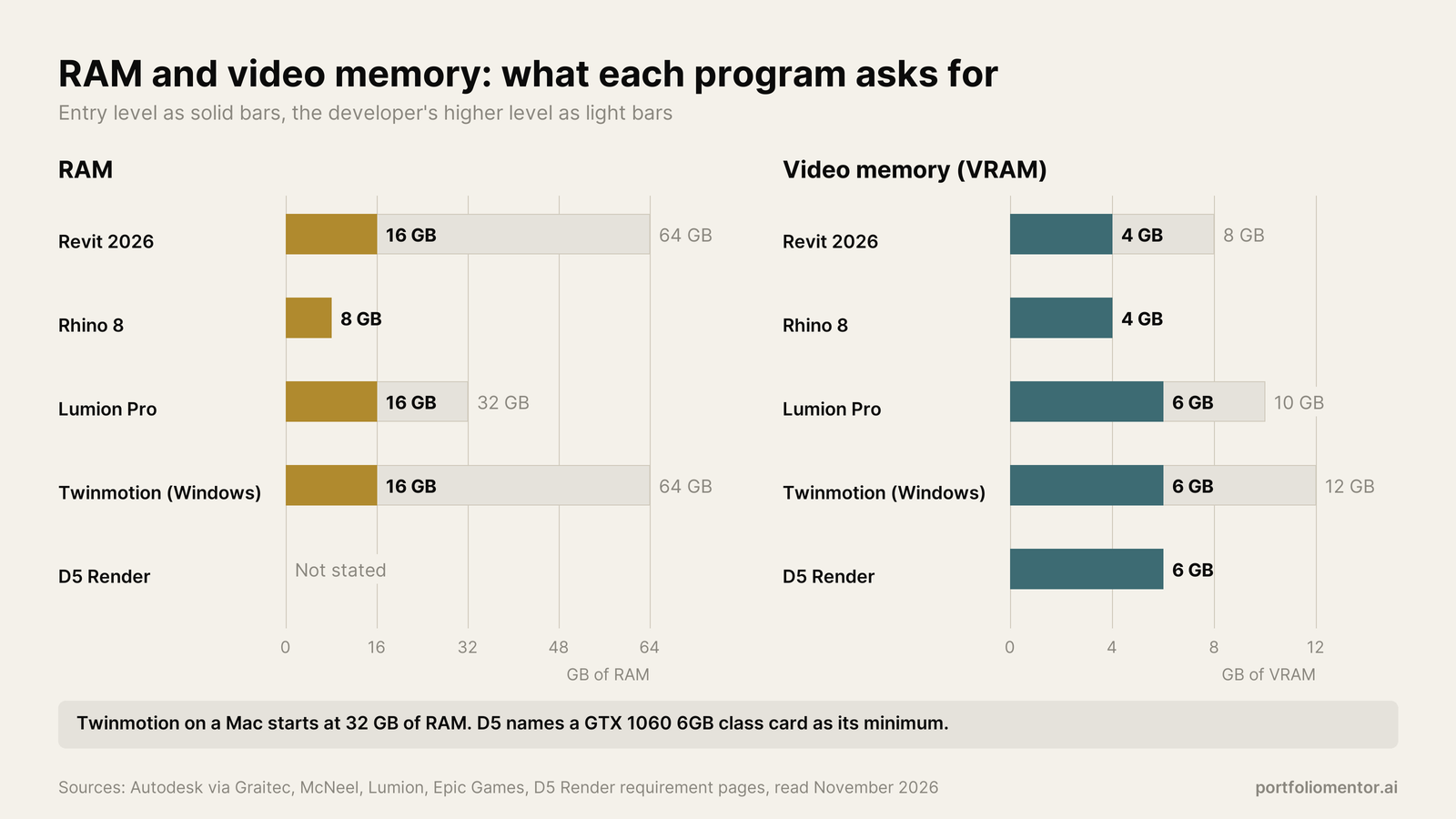
Autodesk’s published requirements, reproduced in full by Autodesk partner Graitec, ask for 64-bit Windows 10 (v1809 or later) or Windows 11 and an Intel or AMD processor of 2 GHz or more, with the highest single-core clock speed recommended. The entry configuration lists 16 GB of RAM as usually enough for a single model of about 300 MB on disk, and a graphics card with at least 4 GB of video memory. The configuration for large, complex models moves to 64 GB of RAM for models around 1 GB, plus 8 GB or more of video memory. Installation takes 30 GB, and Autodesk recommends 100 GB free for temporary files.
There is no macOS version. On a Mac, Autodesk’s recommended route is Parallels Desktop running Windows 11, with 16 GB of memory given to the Windows virtual machine.
Rhino 8
McNeel’s Rhino 8 system requirements are the lightest in this list. On Windows, Rhino needs a 64-bit Intel or AMD processor (ARM is not supported), at least 8 GB of RAM is recommended, plus an OpenGL 4.5 capable card with at least 4 GB of video memory. Rhino 8 for Mac runs on Intel and Apple processors with at least 8 GB recommended. McNeel lists virtualization systems such as Parallels as not supported for the Windows version, so Mac users should install the Mac version rather than the Windows one.
Lumion Pro
Lumion is built around the graphics card, and its official requirements page says so directly. The minimum tier asks for a GPU with a G3DMark of 8,000 or more and 6 GB of video memory, a CPU with a single-thread CPUMark of 2,200 or more, 16 GB of RAM and 105 GB of free disk space for the full version. Lumion itself does not recommend that tier for a new purchase. The recommended tier moves to a G3DMark of 14,000, 10 GB of video memory, 32 GB of RAM and an SSD. Lumion runs on Windows only; on a Mac it is not officially supported, and the workaround Lumion describes relies on Boot Camp, which Apple supports only on Intel-based Macs.
Twinmotion
Epic Games’ Twinmotion specifications cover both platforms. On Windows the minimum is 6 GB of dedicated video memory with a GPU benchmark score of 10,000, 16 GB of RAM and 30 GB of disk space; the high-end level asks for 12 GB of video memory, a score of 20,000 and 64 GB of RAM. On a Mac the minimum is an Apple M1 or M2 series processor with 32 GB of RAM, and the high-end level is an M3 Max or better with 64 GB. Epic notes that the Path tracer and VR mode are not supported on macOS.
D5 Render
The D5 Render help centre sets the minimum graphics card at an NVIDIA GTX 1060 6GB, Intel Arc A3 or AMD RX 6400. Its real-time ray tracing is built on DirectX Raytracing in Windows, which requires Windows 10 v1809 or later. D5 also states that it mainly uses dedicated GPU memory and does not combine several graphics cards.
📐 Technical Note
RAM and video memory (VRAM) are different things. RAM holds your open model; VRAM sits on the graphics card and holds the textures and geometry a renderer draws. A laptop advertised with 32 GB of RAM can still have only 4 GB of VRAM, which falls below Lumion, Twinmotion and D5 minimums. Lumion’s own guide suggests checking both on Windows with the DxDiag tool, under the System and Display tabs.
Requirements side by side
| Software | Native macOS | Entry RAM | Entry video memory | Higher level |
|---|---|---|---|---|
| Revit 2026 | No (Parallels route) | 16 GB | 4 GB recommended | 64 GB RAM, 8 GB VRAM |
| Rhino 8 | Yes | 8 GB recommended | 4 GB recommended (Windows) | Not tiered |
| Lumion Pro | No | 16 GB | 6 GB | 32 GB RAM, 10 GB VRAM |
| Twinmotion | Yes, with limits | 16 GB (Windows), 32 GB (Mac) | 6 GB (Windows) | 64 GB RAM, 12 GB VRAM |
| D5 Render | No (DirectX based) | Not stated | GTX 1060 6GB class | Not tiered |
Three Tiers of Laptops for Architecture Students
The tiers below translate those requirements into a buying spec. Treat each as a floor: meet every line in your tier, and spend any extra money on the graphics card and memory first.
Tier 1: Drawing and modelling
This tier suits students whose course runs mainly on Rhino, CAD and small Revit models, with rendering done in the school lab or in a lighter tool. The spec:
- Processor: a current 64-bit Intel or AMD chip with high single-core speed, or an Apple silicon Mac if your course has no Windows-only software.
- Memory: 16 GB, which matches Revit’s entry configuration and doubles Rhino’s recommendation.
- Graphics: a card with 4 GB of video memory or more, the figure both Revit and Rhino recommend.
- Storage: an SSD with room for Revit’s 30 GB install plus the 100 GB of free space Autodesk recommends for temporary files.
The limit of this tier is real-time rendering. Many thin laptops in it have integrated graphics, which Lumion rules out entirely.
Tier 2: Real-time rendering
This is the tier most students end up needing by second or third year, when reviews start to expect rendered views and walkthroughs. The spec:
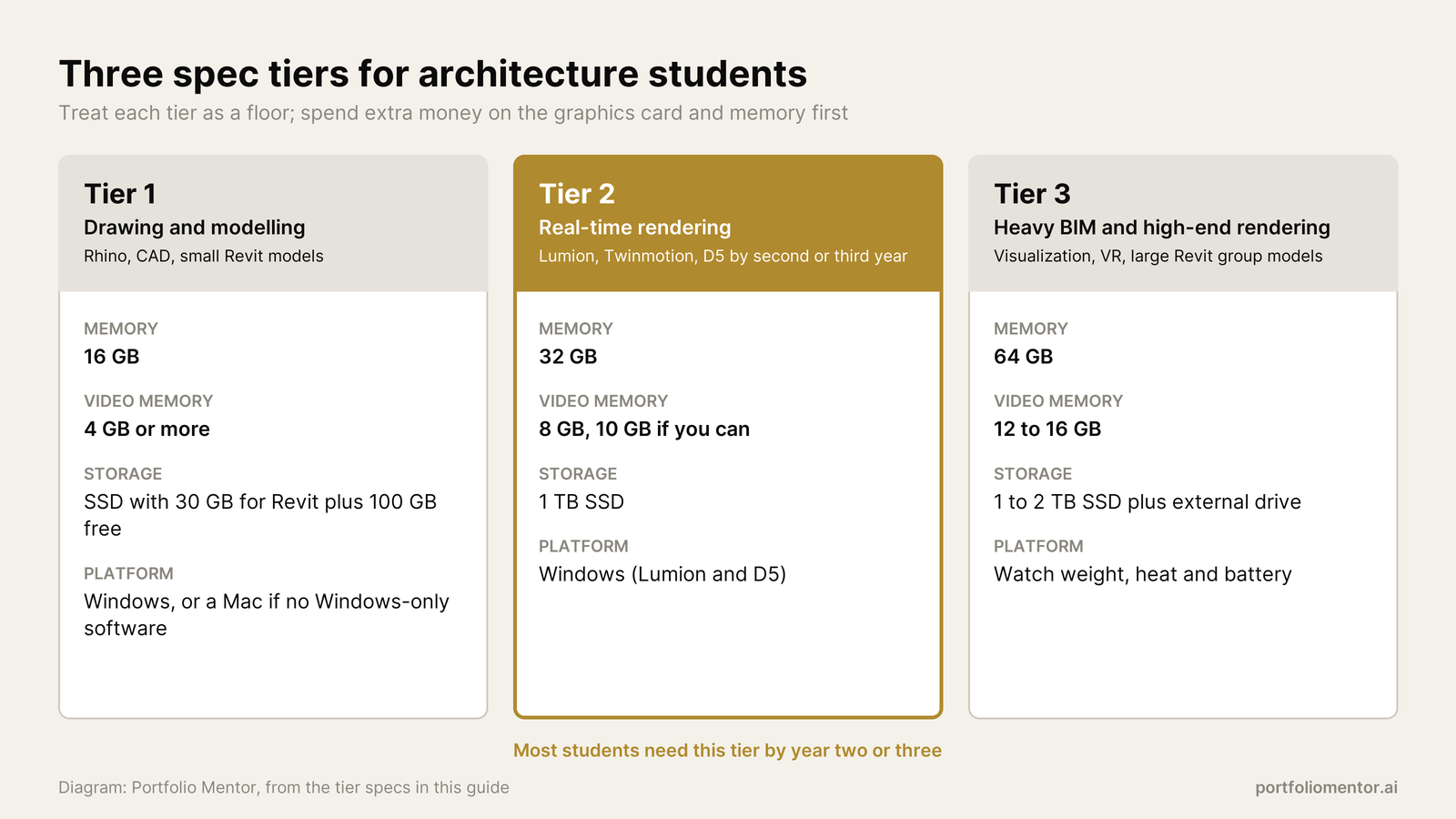
- Graphics: a dedicated card with at least 8 GB of video memory, and 10 GB if you can, which is Lumion’s recommended level. Lumion states that rendering 1080p with ray tracing or 4K with rasterization needs 8 GB, and Epic recommends 8 GB for Twinmotion’s Path tracer.
- Memory: 32 GB, Lumion’s recommended level.
- Processor: one that meets Lumion’s single-thread CPUMark of 2,600 for its recommended tier.
- Storage: 1 TB SSD, since the full Lumion install alone asks for 105 GB of free space.
- Operating system: Windows, because Lumion and D5 are Windows-only.
💡 Pro Tip
When two configurations of the same laptop differ only in screen, take the 1920 x 1080 panel and put the money into video memory. Lumion’s hardware guide warns that a 3840 x 2160 screen is very demanding on a graphics card, even a powerful one, and your renders will not look sharper on a 4K laptop screen at a crit.
Tier 3: Heavy BIM and high-end rendering
Few students need this tier, but it makes sense for those heading into visualization work, using VR in reviews, or working on large Revit group models. The spec:
- Memory: 64 GB, which matches Revit’s large-model configuration and the high-end levels of both Lumion and Twinmotion.
- Graphics: 12 to 16 GB of video memory. Twinmotion’s high-end level asks for 12 GB and Lumion’s for 16 GB.
- Storage: 1 to 2 TB SSD, plus an external drive for archives.
The downside of this tier on a laptop is weight, heat and battery life. A desktop at home with a modest laptop for studio often costs less and performs better than one large laptop.
🔢 Quick Numbers
- 105 GB: free disk space Lumion Pro’s full version requires (Lumion system requirements).
- 300 MB: model size that Revit’s 16 GB entry configuration is rated for; about 1 GB needs 64 GB (Autodesk, via Graitec).
- 32 GB: minimum RAM for Twinmotion on a Mac, double the Windows minimum (Epic Games).
- 6 GB: minimum video memory for Lumion Pro and for Twinmotion on Windows (Lumion, Epic Games).
Mac or Windows for Architecture School?
The honest answer depends on your rendering software. Rhino 8 and Twinmotion both run natively on Apple silicon, so a Mac can carry a Rhino-based course without any workaround. The problems start with Revit, Lumion and D5:
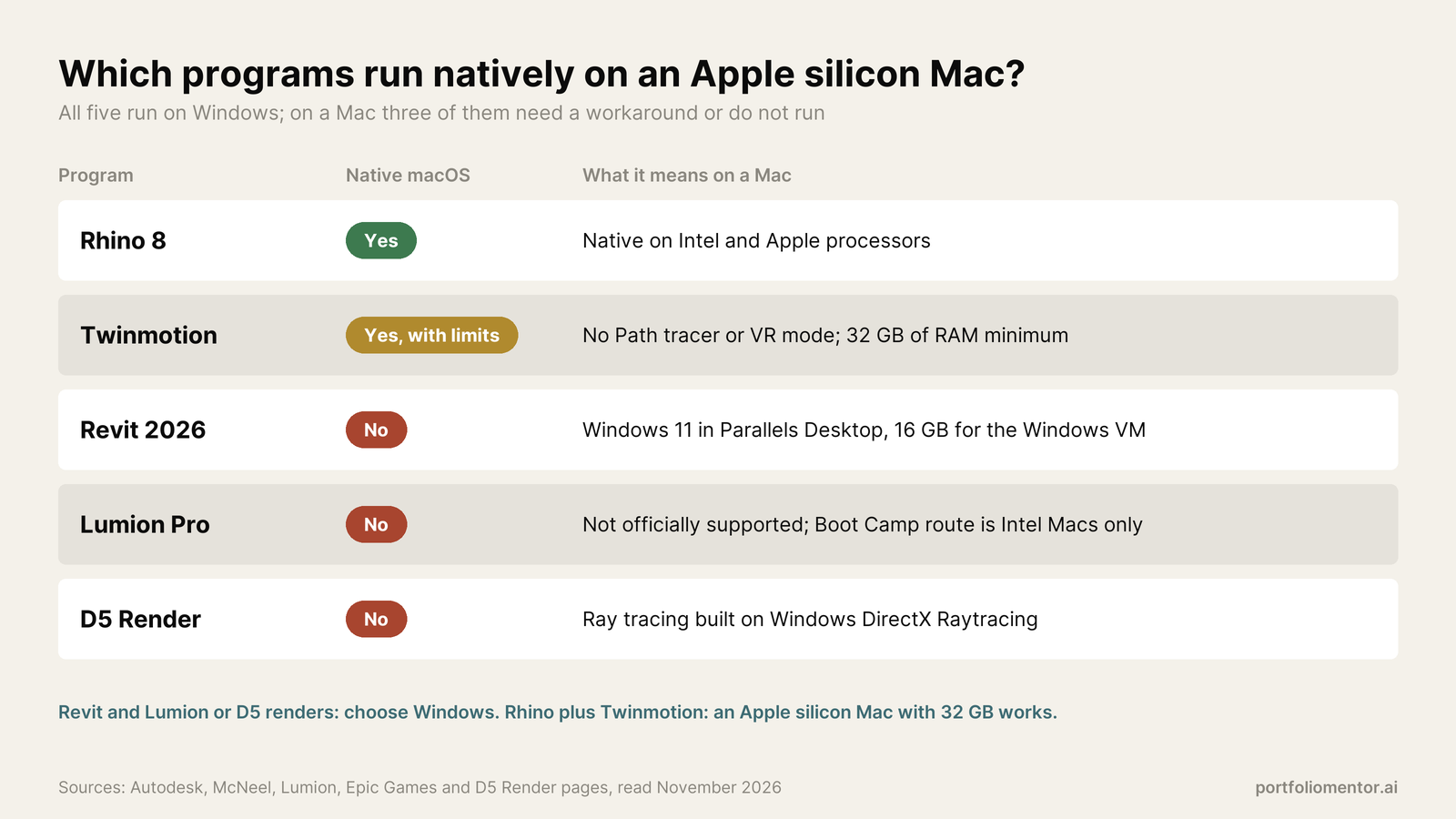
- Revit has no macOS version, so you would run it in Windows 11 through Parallels Desktop, as Autodesk’s own Mac configuration describes.
- Lumion is not officially supported on a Mac, and its suggested route depends on Boot Camp, which Apple restricts to Intel-based Macs.
- D5 Render’s ray tracing is built on Windows DirectX Raytracing.
- Twinmotion does run natively, but without the Path tracer or VR mode, and it needs 32 GB of RAM at minimum on a Mac.
If your school teaches Revit and expects Lumion or D5 renders, a Windows laptop avoids a whole layer of workarounds. If your school is Rhino-based and you render in Twinmotion or a Mac-native renderer, an Apple silicon Mac with 32 GB of memory is a reasonable choice.
⚠️ Common Mistake to Avoid
Buying a Mac and planning to install the Windows version of every program later. On Apple silicon, Boot Camp is not available, Rhino for Windows does not support Parallels, and Lumion is not officially supported. Check each program on your list against its own page before you choose the platform.
How to Buy on a Student Budget
A tight budget changes the order of priorities, not the requirements. Some practical moves:

- Spend on the parts that are hardest to change later. Check the manufacturer’s spec sheet for whether memory can be upgraded on the model you want; the graphics card is part of the laptop, while storage can be extended with an external SSD.
- Check student licences before you buy hardware. Lumion, for example, states that it is free for students and educators, and several other developers run education programs; confirm the terms on each developer’s site as of November 2026.
- Use the lab for peak loads. If your school has a render lab or remote desktops, a Tier 1 laptop plus lab time can carry you through the first two years.
- Test before the return window closes. Install your heaviest program in the first week and open the largest file you have.
Remember that some of the work you will produce does not need a powerful machine at all. Portfolio layout, CV writing and many of the tools in our roundup of AI tools for architects run in a browser. The same goes for publishing; the choice between formats in our digital architecture portfolio guide is about file size and reader experience, not about your graphics card.
Plan for the length of the degree, too. Our breakdown of how long architecture school takes is a useful reminder that a laptop bought in first year may need to last five years or more, which argues for buying one tier above what week one requires.
Requirements are taken from each developer’s page as of November 2026 and change with new software versions. Check your school’s list and the current requirement pages before you buy.
Wrapping Up
Bottom Line: pick your laptop from the most demanding program on your list. For most students that means a Windows laptop with 32 GB of RAM and a dedicated graphics card with at least 8 GB of video memory, which covers Revit’s entry configuration, Lumion’s recommended RAM and its ray tracing memory threshold, and the minimums of Twinmotion and D5. Stretch to 10 GB of video memory if your course leans on Lumion. A Mac works well for Rhino-based courses that render in Twinmotion, as long as it has 32 GB of memory.