Free self-check
Check your portfolio in 50 points
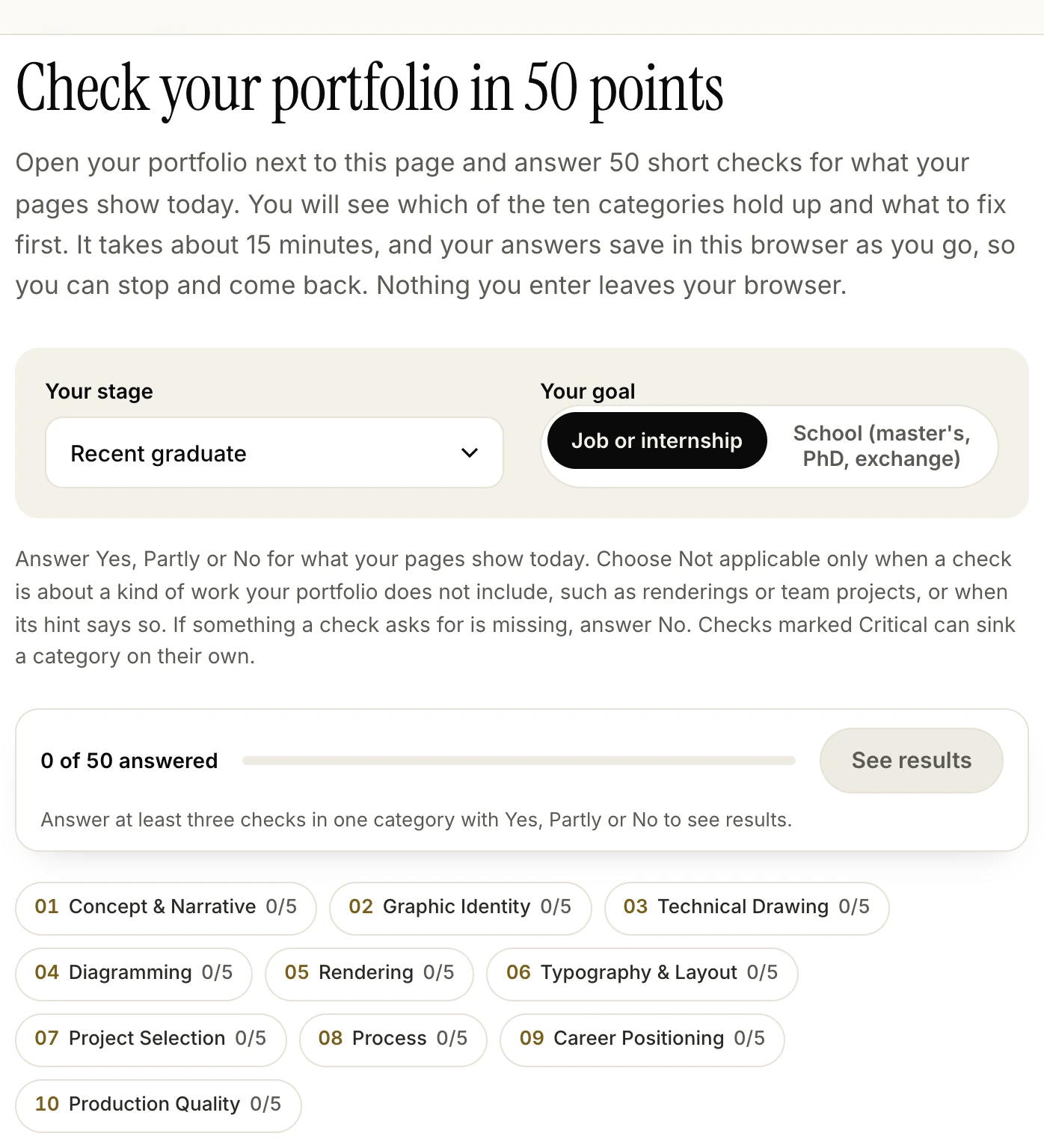
Open your portfolio next to this page and answer 50 short checks for what your pages show today. You will see which of the ten categories hold up and what to fix first. It takes about 15 minutes, and your answers save in this browser as you go, so you can stop and come back. Nothing you enter leaves your browser.
Answer Yes, Partly or No for what your pages show today. Choose Not applicable only when a check is about a kind of work your portfolio does not include, such as renderings or team projects, or when its hint says so. If something a check asks for is missing, answer No. Checks marked Critical can sink a category on their own.
Concept & Narrative
Does each project argue for one idea a reader can repeat back?
Why it matters and how to fix it
Reviewers often skim. Without a stated idea, the pages that follow read as a list of deliverables instead of an argument.
Fix: Write the driving idea in under 35 words and place it on the project's opening page, next to the lead image.
Why it matters and how to fix it
Pages that do not connect to the idea dilute it, and the reader stops looking for the thread.
Fix: Write that phrase next to each page while you edit. Cut or move the pages where you cannot.
Why it matters and how to fix it
A reader cannot judge a response without knowing what it responds to.
Fix: Add the fact line under every project title, with the same order and style in every project.
Why it matters and how to fix it
A sequence lets the reader follow your reasoning instead of reconstructing it from scattered pages.
Fix: Lay the project's pages out as thumbnails and reorder them so each one answers the question raised by the page before.
Why it matters and how to fix it
Long paragraphs are often skipped on a first read, so the point they hold can be lost.
Fix: Cut each text block to its first claim and one supporting fact. Move the rest into captions next to the images it explains.
Graphic Identity
Does the document look like one author made it, from cover to last page?
Why it matters and how to fix it
If the first page does not say whose work this is, the file can be misfiled or forgotten after a first look.
Fix: Put your name, "Architecture Portfolio" (or your discipline) and the year on the cover, large enough to read in a thumbnail.
Why it matters and how to fix it
A shared palette makes separate projects read as one body of work and lets color carry meaning.
Fix: Pick an accent color and up to two neutrals. Recolor headings, highlights and accent graphics to that set.
Why it matters and how to fix it
Page numbers let a reviewer point to a page in notes. Titles and captions that move make each page feel like a new document.
Fix: Put page numbers, running titles and caption styles on master pages and apply them to every spread.
Why it matters and how to fix it
A matching set shows you can control a whole presentation, not only the pages of one document.
Fix: Build one header with your name and contact line and reuse it, with the same typefaces, in every document you send.
Why it matters and how to fix it
When the frame competes with the work, the reader remembers the frame.
Fix: Remove those effects, or keep one only where it carries information, such as a tinted band that marks each project.
Technical Drawing
Can a reviewer read your drawings the way they would read a drawing set?
Why it matters and how to fix it
Without scale and orientation a drawing reads as a picture. A stated ratio such as 1:100 is wrong once the page is resized.
Fix: Add a graphic scale bar to every plan, section and elevation, and a north arrow to every plan.
Why it matters and how to fix it
Uniform line weight flattens plans and sections and makes it hard to tell what is cut from what lies beyond.
Fix: Set at least three line weights (cut, beyond, surface or texture), draw overhead and hidden elements dashed, and use them in every drawing.
Why it matters and how to fix it
A reviewer needs to know what each drawing is and where a section is cut before they can read it.
Fix: Title every drawing (for example Ground floor plan, Section A) and mark each section cut on the plan with the same letter.
Why it matters and how to fix it
Plans and sections show how space, structure and light work together. A project shown only in renderings cannot be judged as architecture.
Fix: For each main project, add a plan and a section cut through the main space, drawn with the same line weights and labels as your other drawings.
Why it matters and how to fix it
Reviewers want to know whether you can take a design toward construction, not only propose it.
Fix: Add one detail or wall section to your strongest project, drawn at a scale where materials and layers are identifiable.
Diagramming
Do your diagrams explain decisions instead of decorating pages?
Why it matters and how to fix it
A diagram can show the reasoning behind a design faster than a paragraph.
Fix: For each project, choose the decision a reviewer is most likely to question and draw a diagram that explains it.
Why it matters and how to fix it
A diagram that tries to show everything leaves the reader with little they can remember.
Fix: Split crowded diagrams into a sequence, each with one idea and one title.
Why it matters and how to fix it
A diagram that needs the body text to make sense fails whenever the reader looks at the image first.
Fix: Give every diagram a short title that states its point, and label or key every color and line type it uses.
Why it matters and how to fix it
A shared language lets the reader compare projects and recognize your hand.
Fix: Make a small diagram style sheet (line weights, colors, arrow style, font) and redraw older diagrams to it.
Why it matters and how to fix it
Analysis that leads nowhere reads as a required step, not as thinking.
Fix: Add an arrow, caption or reference that connects one analysis finding to the design move it caused.
Rendering
Does every image earn its space and say who made it?
Why it matters and how to fix it
An image that repeats what a plan or elevation already shows takes space without adding information.
Fix: For each rendering, write what it shows that no drawing does. Replace or cut the ones where the answer is nothing.
Why it matters and how to fix it
Mixed styles make a project look assembled from different sources and pull attention to the images instead of the design.
Fix: Choose one image approach per project (time of day, color treatment, level of finish) and replace or rework the images that do not match it.
Why it matters and how to fix it
Reviewers judge your skill from the images. One image shown as yours that was not can make them doubt the rest of the portfolio.
Fix: Add a short credit to every image you did not make (photographer, visualization studio, office) and label images made or changed with generative AI.
Why it matters and how to fix it
The lead image is the first thing a reader sees in a project and often sets how they read the rest.
Fix: Pick the view that shows the stated idea most directly and place it first and largest on the project's opening page.
Why it matters and how to fix it
A dim, cluttered model photo signals a rushed portfolio even when the model is well made.
Fix: Photograph models against a plain background in even light, and scan sketches instead of photographing them with a phone at an angle.
Typography & Layout
Is every page readable, aligned and easy to scan?
Why it matters and how to fix it
Text that has to be enlarged to read is often skipped.
Fix: Check each page at 100% zoom and in a test print. At final print size, keep body text at about 9 to 11 pt and captions no smaller than 7 pt.
Why it matters and how to fix it
Edges that almost line up look like mistakes and pull attention away from the work.
Fix: Set a column grid on master pages and snap every image and text frame to it.
Why it matters and how to fix it
Extra typefaces add noise. A small, consistent set lets the work carry the attention.
Fix: Choose one family for text and at most one for titles, then define paragraph styles for each level and apply them everywhere.
Why it matters and how to fix it
Pages with several equal elements leave the reader to decide what matters, and they may not pick what you intended.
Fix: On each spread, make one image or drawing clearly larger or stronger than the rest, and group the smaller items around it.
Why it matters and how to fix it
Uneven spacing makes pages look crowded even when they hold little.
Fix: Use the same margin on every page and the same gap between images, and let full-bleed images run fully off the edge.
Project Selection
Is the strongest, most relevant work in front?
Why it matters and how to fix it
The first project sets the reader's expectations, and a reader short on time may not get past it.
Fix: Rank your projects by the quality of the work and move the top one to the front.
Why it matters and how to fix it
Projects that repeat the same skill make the portfolio longer without making it stronger.
Fix: Write one sentence per project on what it adds. Cut or shorten the projects whose sentence repeats another.
Why it matters and how to fix it
A portfolio over a stated page or project limit can be set aside before anyone looks at the work.
Fix: Read the application instructions for page and project limits, and build the version that meets them before any other version.
Why it matters and how to fix it
A firm that builds housing reads a housing project differently from a firm that designs museums.
Fix: Before each application, reorder projects so the work closest to the office's focus appears in the first pages.
Why it matters and how to fix it
Work done under real constraints tells an office more about how you will work there than studio work alone.
Fix: Add one practice or competition project with a caption on the stage and your role, even if it is a few pages.
Process
Can a reader see how you think, not only what you finished?
Why it matters and how to fix it
Process shows how you think, which is what a reviewer is trying to predict.
Fix: Add one development spread to your strongest project with three to five steps that led to the final design.
Why it matters and how to fix it
A page of every sketch shows effort but hides the decisions that matter.
Fix: Keep only the process images where something changed, and caption each with the decision it shows.
Why it matters and how to fix it
Out-of-order process makes the final design look arbitrary.
Fix: Arrange development images left to right or top to bottom in time order, ending next to the resolved drawing they produced.
Why it matters and how to fix it
Testing shows judgment. It tells the reader you check ideas before committing to them.
Fix: Add the study that changed your mind on one project and state what it showed.
Why it matters and how to fix it
Comparing options shows you can evaluate your own work, not only produce it.
Fix: Place two options side by side with one line on the criterion that decided between them.
Career Positioning
Does the portfolio make clear who you are and what you did?
Why it matters and how to fix it
Without a role line, a reader cannot tell which work is yours, so they cannot judge your part in a team project.
Fix: Add a credit line to each team project: team or office, your role, and the drawings or decisions that were yours.
Why it matters and how to fix it
A reader judges your work against your stage. Without these facts, they have to guess what to expect from you.
Fix: Add one line to the CV header or intro page with your degree, school and graduation year, or the year you expect to graduate.
Why it matters and how to fix it
When the documents point to different roles or strengths, the reader cannot tell which one to believe.
Fix: Pick two or three strengths and make sure each document shows them: the CV states them, the letter claims them, the portfolio proves them.
Why it matters and how to fix it
Portfolios get forwarded without their emails. The file itself has to say how to reach you.
Fix: Add your email, phone and any portfolio link to the cover or the back page, in text that can be copied.
Why it matters and how to fix it
Office work shown without the office name reads as your own design, and showing it without permission may break a confidentiality agreement.
Fix: Name the office on every practice project, and confirm with each office which drawings and images you may show.
Production Quality
Does the file arrive clean, sharp and easy to open?
Why it matters and how to fix it
A blurry or distorted image reads as carelessness, whatever it shows.
Fix: Check every image at 100% zoom, use images of about 300 ppi at their printed size, and keep the original proportions when resizing.
Why it matters and how to fix it
A file that is too large to send or slow to open may never be opened.
Fix: Export with image compression set for screen use, check the final size, and keep a separate high-resolution file for print.
Why it matters and how to fix it
Typos in a document meant to show attention to detail undercut the whole message.
Fix: Run a spell check, then read every caption aloud once. Check project names against one list and use one capitalization rule for titles.
Why it matters and how to fix it
Reviewers zoom into plans and details. Lines that blur or break into pixels hide the drawing skill the page is meant to show.
Fix: Export drawings from CAD or BIM as PDF or vector files, place them in the layout, and flatten only heavy hatches that inflate the file size.
Why it matters and how to fix it
Some export problems, such as missing fonts, show up only on another computer, so the reviewer may see them before you do.
Fix: Open the export on another device and check fonts and colors. For screen reading, export spreads as single wide pages so every viewer shows them paired.
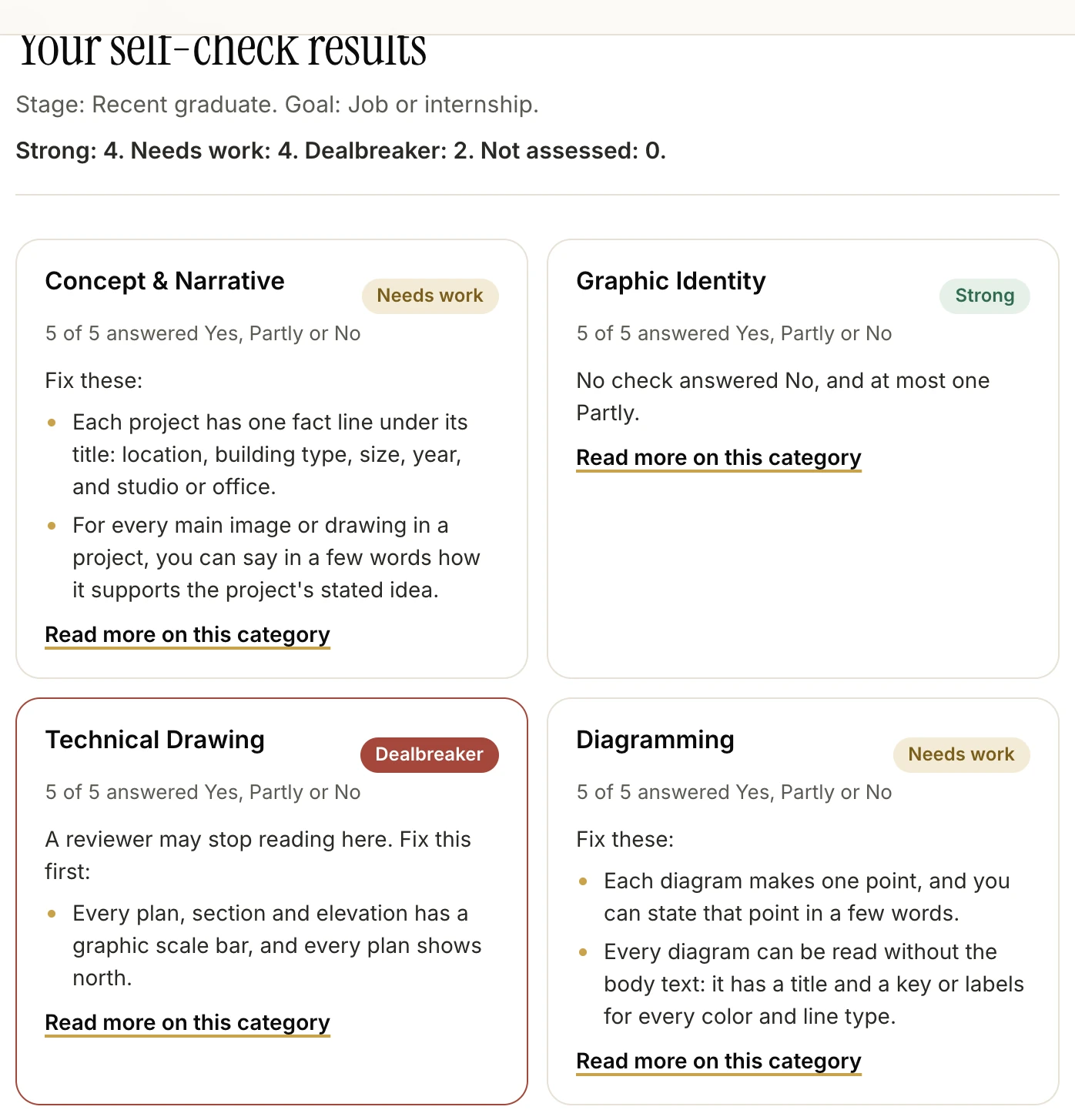
A portfolio checklist is a page-by-page self-check you run against your own architecture portfolio before you send it. This one has 50 observable checks across ten review categories. Each category comes back as Strong, Needs work or Dealbreaker, and the results rank up to five fixes, starting with critical failures.
Open your portfolio PDF next to the tool above and answer each check for what your pages show today, not for what you plan to add. The checks are written for architecture students and graduates applying for jobs, internships and master’s programmes. You need no account, nothing you enter leaves your browser, and the tool estimates about 15 minutes for a full pass.
How to Use the Portfolio Checklist
Start with the two settings at the top: Your stage (six options, from undergraduate student to senior architect) and Your goal (a job or internship, or a school application). They change what you see. An undergraduate gets 49 checks, because the technical resolution check (a wall section or junction detail) starts at the graduate stage. The school goal swaps “cover letter” for “statement of purpose” and asks whether projects are ordered for the programme rather than an office. From three years in practice, checks turn to construction documents and built-work photos.
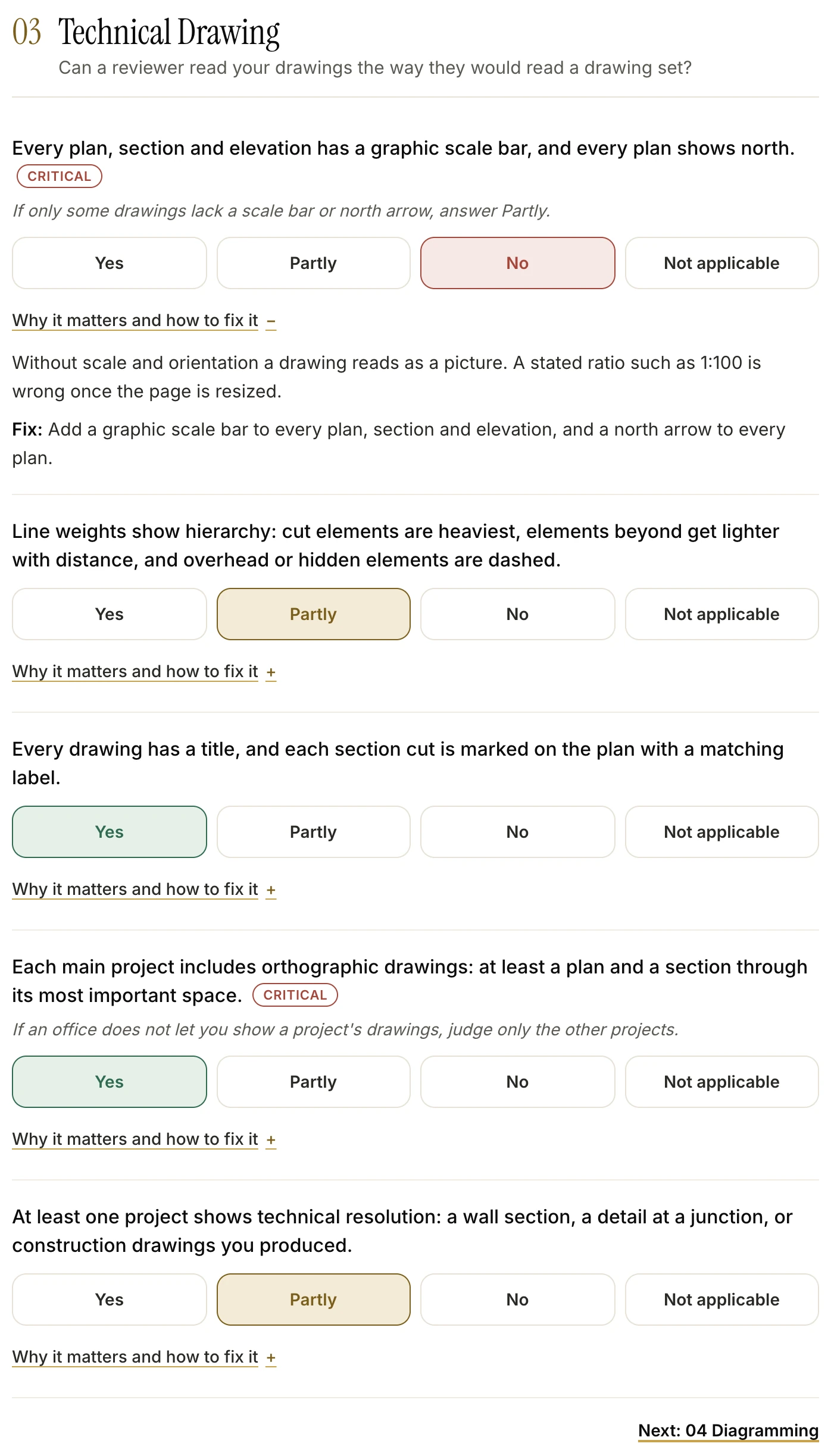
Each check takes one of four answers:
- Yes: your pages already do this.
- Partly: some pages do, some do not. Several checks carry a hint on when Partly fits.
- No: what the check asks for is missing.
- Not applicable: only for work your portfolio does not include, such as renderings or team projects, or when the hint says so.
Checks tagged Critical can sink a category on their own. Under every check, “Why it matters and how to fix it” opens a short note and one concrete fix. A sticky bar counts your answers, and the category list lets you work in any order.
See results becomes active as soon as one category can be labeled: three answers of Yes, Partly or No in one category, or a Critical check answered No. You can open the results early, return with Back to the checklist and keep answering.
The Ten Categories and What Each One Checks
The checklist uses the same ten categories as the Portfolio Mentor review rubric, five checks each. Eleven of the 50 checks are Critical. Diagramming and Process have none, so those two can be marked Needs work but never Dealbreaker.
Concept & Narrative
The Critical check asks for a one- or two-sentence statement of each project’s driving idea on its opening page. The others look for images that support that idea, a fact line under each title (location, type, size, year, studio or office), a page order a reader can trace, and no text block over about 150 words.
Graphic Identity
The cover must show your name and what the document is at a readable size (Critical, unless the application asks for an anonymous portfolio). Then a small shared color set, page numbers, fixed title and caption positions, a CV and letter that match, and no decorative textures or drop shadows.
Technical Drawing
Two Critical checks: every plan, section and elevation has a graphic scale bar and every plan a north arrow, and every main project has at least a plan and a section through its main space. The rest cover line weight hierarchy (our line weight calculator gives you a set by scale), drawing titles with section cuts marked on the plan, and from the graduate stage up, one detail or wall section you drew.
Diagramming
At least one analytical diagram per project, one point per diagram, a title and key so it reads without the body text, one graphic language across projects, and site analysis linked to the design decision it caused.
Rendering
The Critical check is authorship: every image you did not make is credited, and images made or changed with generative AI are labeled. Disclosure of AI-generated material is already expected elsewhere; the US Copyright Office has published registration guidance for works that contain it. The others ask that each rendering show what drawings cannot, that a project’s images share one style, that the lead image carry the idea, and that model photos be shot straight on.
Typography & Layout
All text, captions and drawing labels included, must be readable at 100% zoom on a laptop and in print (Critical). The fix suggests about 9 to 11 pt body text and captions no smaller than 7 pt at final print size. Then a grid, at most two typeface families, one dominant element per spread, and consistent margins.
Project Selection
Two Critical checks: your strongest project comes first, and the portfolio meets every stated page and project limit. Limits can be strict. Columbia GSAPP states on its admissions FAQ (as of November 2026) that the digital portfolio should be a single PDF of at most 20 pages, cover and contents included, and no larger than 32 MB. The others ask whether each project adds something new, whether the order suits the office or programme, and whether the selection shows range (for recent graduates and juniors, practice or competition work).
Process
At least one project shows development, with captions naming decisions, images in time order, a test that changed your mind, and two options compared. For juniors and up applying to jobs, the last check asks which work stages you contributed to. In the UK those map onto the RIBA Plan of Work, which organizes a building project into eight stages.
Career Positioning
Every team, group or office project states your role and what you produced (Critical). The CV or opening page gives your degree, school and graduation year; from junior level, your role, years in practice and any license. Licensing rules vary: in the US, NCARB notes that each state sets its own. The rest cover one story across documents, contact details in the file, and tools named in captions (for graduates and up, the office named on practice work).
Production Quality
Two Critical checks: no raster image is pixelated, stretched or visibly compressed, and the file meets any stated size limit, or stays under 10 MB when none is given. Then proofreading, drawings placed as vectors rather than screenshots, and an export opened on another device to confirm fonts, colors and page order. Our guide to portfolio size and file limits covers export settings.
📐 Technical Note
The checklist asks for a graphic scale bar, not only a stated ratio. A label such as 1:100 is true only at the sheet size you drew it for; on a laptop screen or zoomed in it is wrong, while a scale bar resizes with the drawing.
What Strong, Needs Work and Dealbreaker Mean
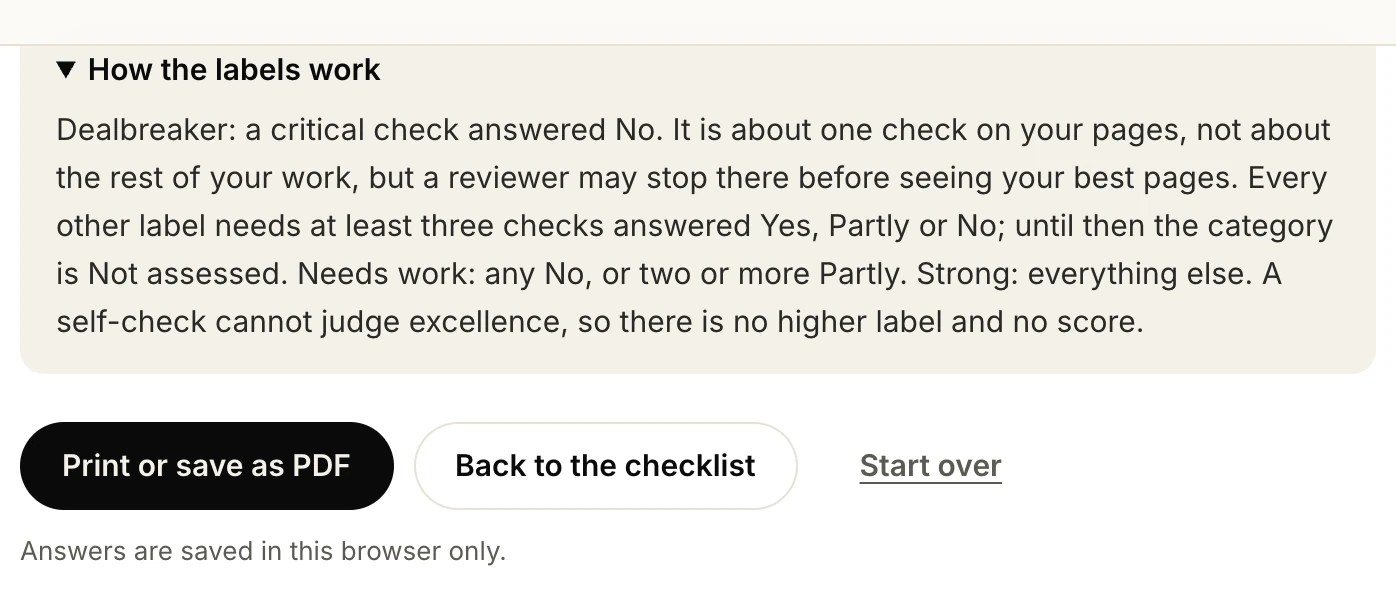
The labels follow fixed rules, applied in this order, and the results screen repeats them under “How the labels work”.
| Label | Rule | What it asks of you |
|---|---|---|
| Dealbreaker | A Critical check answered No | Fix before you send anything |
| Not assessed | Fewer than three answers of Yes, Partly or No | Answer more checks in that category |
| Needs work | Any No, or two or more Partly | Work through the listed checks |
| Strong | No No answers, at most one Partly | Spend your time elsewhere |
A Dealbreaker is about one check on your pages, not the rest of your work: a reviewer may stop there before reaching your best pages. Not applicable answers do not count toward the three needed for a label, so a category where most checks do not apply to you can stay unlabeled.
There is no overall score and no percentage. A self-check cannot judge excellence, so nothing sits above Strong, and a single number would hide the one category costing you interviews. Each card lists the checks behind its label and notes when a label rests on a partial set (“Based on 3 of 5 checks”).
How the Fix List Is Ordered
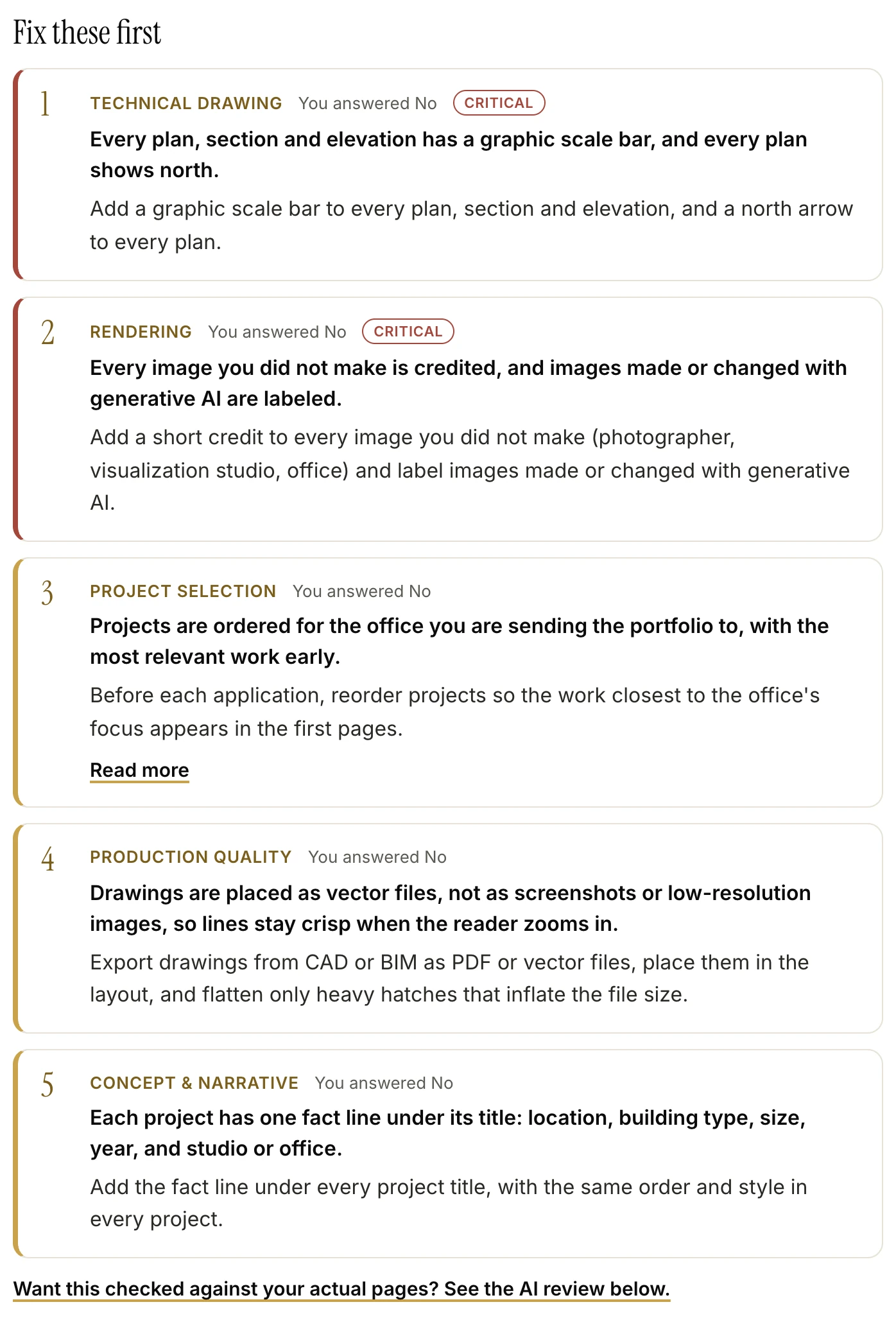
“Fix these first” sits at the top of the results because it is the part you act on. It holds up to five checks: Critical checks answered No, then other No answers, then Partly. Ties follow a category order set by your goal. For a job or internship, Project Selection, Technical Drawing and Career Positioning come first; for a school application, Concept & Narrative, Process and Project Selection lead. Each item shows your answer, the fix and, where one exists, a guide link.
Take a recent graduate applying for jobs who answers No to scale bars, image credits, project order, vector drawings and the fact line. The two Critical items come first (Technical Drawing before Rendering, since it ranks higher for a job), then the other three in job order: Project Selection, Production Quality, Concept & Narrative. Partly answers enter the list only when you have fewer than five No answers.
How to Plan Fixes Before a Deadline
Work down the fix list and sort items by how long they take. Many Critical fixes are quick: scale bars and north arrows, a role line per team project, image credits, your name on the cover, a re-export under the size limit. A missing plan and section is the slow one; if you cannot draw it in time, consider cutting the project. Our list of architecture portfolio mistakes goes deeper on several of these.
After each round of edits, update the answers you fixed and reopen the results; the next items move up. Print or save as PDF keeps the results as a to-do sheet, printed without the site around them.
💡 Pro Tip
Rerun the Project Selection checks for every application. Page limits differ between programmes and offices, and project order depends on where you are sending. Save each results PDF under the application’s name.
School applicants should switch the goal to School before the last pass, since the statement of purpose and programme-order checks only appear there. Our guide to the M.Arch application portfolio covers what admissions committees read.
Common Portfolio Mistakes the Checklist Catches
Each item below is a check in the tool, so you can confirm or rule it out on your own pages:
- Plans and sections with a stated ratio but no scale bar, and plans without north.
- Projects shown only through renderings, with no plan or section.
- Images from a visualization studio, an office or a generative AI tool with no credit or label.
- Team and office projects with no line saying what you did.
- A portfolio over the stated page or project limit, or a file too large to attach.
- Drawings placed as screenshots that break into pixels when zoomed.
- Captions and labels too small to read at 100% zoom.
- A cover that does not say whose portfolio it is (see our cover page guide), and no contact details in the file.
⚠️ Common Mistake to Avoid
Answering for the portfolio you intend to finish. If most drawings have a scale bar but some do not, answer Partly; if a project has no section yet, answer No. Generous answers give a Strong label while the problem stays on the page.
Several fixes (page numbers, caption styles, export presets) happen in the layout file; our InDesign portfolio guide walks through that setup.
Portfolio Checklist or AI Portfolio Review?
Use the checklist first, and again every time you change the portfolio. It is fast and tells you which category to work on, but it depends on your own reading of your pages: if you believe a diagram makes one clear point, the checklist believes you too.
An outside review reads the actual pages. The Portfolio Mentor AI review reads your PDF page by page against the same ten categories and tells you what to fix, which helps most when your self-check looks Strong but applications are not turning into interviews. To compare review options in general, see our guide on how to choose an architecture portfolio review.
Privacy: Where Your Answers Go
Your answers, stage and goal are saved in this browser’s local storage, so you can continue later on the same device. They are never sent to a server: no email, no account and no cookies of the tool’s own. If the site’s analytics is running, the page may record that a checklist was started or results were viewed, with stage and goal only, never your answers.
Answers do not follow you to another device, and a browser that blocks storage shows a warning. Start over clears everything after a second click. The rest of our utilities are on the free tools page.
Frequently asked questions
Is the portfolio checklist free, and do I need an account?
Yes, it is free and works without an account or email address. Open your portfolio next to the page, pick your stage and goal, and start answering.
How long does the checklist take?
The tool estimates about 15 minutes for all 50 checks. Your answers save in this browser as you go, so you can stop after a few categories and come back later.
Why is there no overall score?
A self-check cannot judge excellence, and a single number would hide which category is causing the problem. Instead, each of the ten categories gets a label (Strong, Needs work, Dealbreaker or Not assessed) and the results list up to five checks to fix first.
What happens when I answer Not applicable?
The check is left out of the category label. A category needs at least three answers of Yes, Partly or No to be labeled, so if most of its checks do not apply to you it stays Not assessed. Use Not applicable only for work your portfolio does not include, or when the check’s hint tells you to.
Can I use the checklist for a master’s or PhD application?
Yes. Set your goal to School. The wording changes to refer to your statement of purpose and the programme’s focus, and the fix list gives priority to Concept and Narrative, Process and Project Selection.
Are my answers stored anywhere?
Only in your own browser’s local storage. Nothing you enter is sent to a server. Start over clears the saved answers, and you can save the results as a PDF if you want a copy.